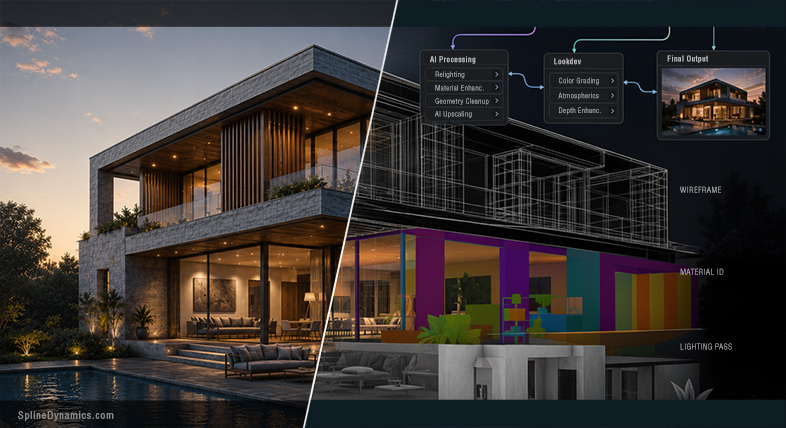
A grounded look at how AI-assisted workflows, hybrid pipelines and technical artists are reshaping Architectural Visualization production.
Something Is Quietly Changing in ArchViz Pipelines
There’s a version of the AI conversation in ArchViz that lives entirely on social media — dramatic demos, instant photorealism, the promise that prompts will make geometry irrelevant. And then there’s what’s actually happening in production. The two don’t quite match.
What you notice, if you pay attention to the right places — the forums, the GitHub threads, the workflow posts from working artists rather than their polished showcase feeds — is something more specific and more interesting than a revolution. AI is entering real pipelines. Not by replacing them, but by attaching itself to them at particular friction points. The 3D scene still exists. Clients still request revisions. The render still needs to be consistent across eight or twelve coordinated views.
The shift happening right now is quieter than the headlines suggest, and considerably more instructive. This article is an attempt to describe it honestly.
Why ArchViz Is Fertile Ground for AI-Assisted Workflows
Architectural visualization has always demanded more than visual talent. A strong set of deliverables — exteriors, interiors, aerials, close-ups, all coherent and revision-safe — involves a level of technical discipline that sits somewhere between craft and engineering. Scene organization, asset management, material accuracy, lighting setups, render optimization, postproduction, version control: these are the unglamorous realities behind the polished images.
Because of that, the field has always attracted practitioners who care about systems. Long before the current AI cycle, ArchViz had a strong scripting and automation culture. Technical artists were building custom utilities, batch processes, render managers, and specialized plugins. Automation was not a foreign concept. It was survival. AI did not arrive in an industry unfamiliar with toolmaking — it arrived in one that was already hungry for better ways to reduce friction.
At the same time, ArchViz exposes AI’s limitations faster than almost any other discipline. A concept artist can get away with a single compelling image. A professional visualization studio cannot. The requirement for consistency, precision, and revision-safe output isn’t going away — and in many ways, it’s precisely what separates serious architectural visualization from the broader category of “AI-generated architectural imagery.” Those are different things, with different production standards and different professional accountability.
This is what makes ArchViz such a useful lens for understanding where AI actually helps and where it still falls short.
The New Hybrid Pipeline: 3D as Control Layer, AI as Enhancement Layer
The most honest description of how AI is entering serious ArchViz production isn’t a single tool or a single workflow — it’s a structural pattern. The 3D scene remains the source of truth. Geometry, camera position, proportions, material assignments, scene structure: these still come from the model. What’s changing is what gets built on top of that foundation.
AI is inserting itself at increasingly specific points: concept exploration and moodboard alignment before significant modeling begins, material and texture development, postproduction for denoising and upscaling, inpainting to add entourage without manual placement, atmosphere or relighting work on top of an already-rendered base image. The structure stays intact. The AI layer touches specific outputs at specific moments, guided by the geometry the scene provides.
Hybrid 3D + AI workflow using material IDs and controlled masking for consistent ArchViz outputs.
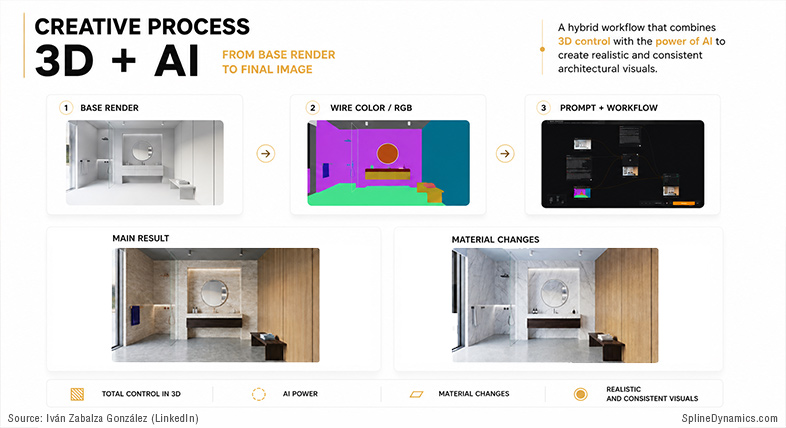
Iván Zabalza González, archViz expert and CEO at Señapaula SL, described his actual production workflow this way: render passes — wirecolor, material IDs — tell the AI precisely which zones correspond to which finish, what materials to apply, where geometry and composition must remain untouched. His assessment: “the system is quite consolidated, works very reliably, and — when well set up — does not fail.” That kind of confidence doesn’t come from a demo. It comes from production repetition.
It’s worth being clear about what this model doesn’t include. Prompt-only generation is not a production workflow for client-facing ArchViz. For projects requiring controlled revisions, consistent multi-view output, and professional accountability — which describes most serious studio work — purely text-driven image generation is still unsuitable as a primary pipeline. That’s not a forecast. It’s a description of where the technology is right now.
The hybrid model also clarifies where the most valuable AI tools actually sit. Not the ones generating the most spectacular standalone images — but the quietest ones: a denoiser that cleans a medium-sample render to delivery quality, a material generator that produces a usable PBR starting point from a reference photo, an upscaler that brings a viewport capture to presentation resolution. These are not headline features. They are workflow compressions. And that’s exactly why they get adopted.
Tools and Ecosystems Worth Watching
Approaching the current AI landscape as a list of tools is a good way to produce content that’s outdated in three months. A more durable approach is to look at ecosystems: the clusters of tools, workflows, and technical patterns forming around specific production problems.
The most immediately relevant ecosystem for professional ArchViz is AI embedded directly in render engines. V-Ray, Corona, and Enscape have all been systematically adding AI features — denoising, upscaling, material generation, atmosphere matching — into products professionals already use and already pay for. The adoption barrier for these features is near zero: they don’t require a new pipeline. They arrive inside the tool you already know.
Closely related is the emerging category of BIM-connected AI rendering. Chaos Veras — available as a plugin for Revit, SketchUp, Rhino, Vectorworks, Archicad, and now bundled with Enscape Premium — grounds AI output in the actual project geometry rather than generating from text prompts alone. The results are still subject to drift at higher creative override settings, but the approach is structurally more compatible with professional architecture workflows than pure prompt-based tools. This category is maturing faster than most.
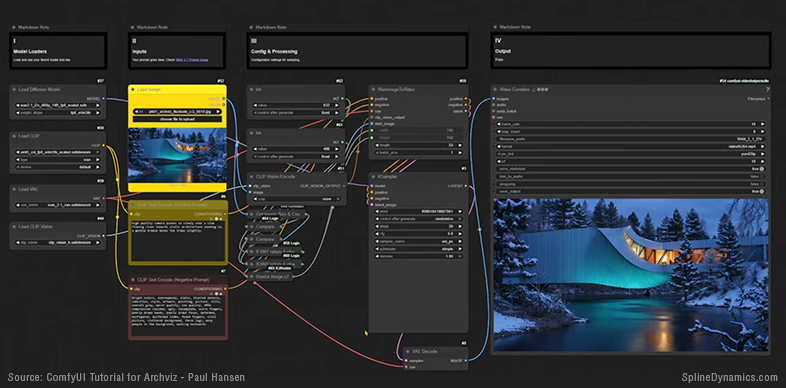
The open-source ecosystem around ComfyUI, ControlNet, and foundation models like FLUX and SDXL occupies a different position: not the most stable, but arguably the one with the highest ceiling for technical artists willing to invest in it. The ability to combine depth passes, material ID masks, style references, and custom generation pipelines in a node-based interface is genuinely powerful — and real workflows are being built here, not just demos.
Image-to-3D tools like Meshy and Tripo deserve a mention, not because they’re production-ready — they aren’t, for most DCC workflows — but because the direction of travel is worth watching. The gap between an impressive-looking mesh in a demo and a production-usable asset with clean topology remains significant. For static background elements, some of these tools are already useful. For anything requiring animation or precision, not yet.
Node-based ComfyUI workflow for AI-assisted architectural visualization and image-to-video generation.
Reality Check — What These Tools Still Can’t Do
The most useful thing this article can do is be honest about the gap between what gets shown and what gets used. That gap is substantial.
The most critical limitation in professional ArchViz is multi-view consistency. A single AI-generated image can be extraordinary. But a real project requires eight to twelve coordinated views of the same building — matching materials, consistent geometry, identical context, and the ability to handle client revisions across the full set. Current generative AI cannot maintain this coherence reliably. Materials shift. Windows appear at different proportions. The building that looks convincing from one angle may have structurally impossible balconies in the next.
Joël Feyaerts, co-founder at Blacksquid and a longtime voice in the CGarchitect community, named this plainly: “The balcony sits two floors higher than on the plan. The railing turns into a wall halfway across. A window that repeats identically in every neighboring unit, because AI does not understand what a grid is. The architects see this. I am sure of that.” And he drew a distinction that deserves wider circulation: “An AI render in the concept phase is exceptional. Faster, cheaper, freer. An AI render in the sales phase, with broken balconies and inconsistent rhythm, is not a workflow. It is a deferred problem.”
The revision workflow problem follows from this. In traditional 3D production, changing a curtain wall color or adjusting a balcony depth propagates from the model through all renders. AI regeneration doesn’t work that way — a revision means regenerating the image, and the elements already approved may not survive intact. For client-facing work with multiple feedback rounds, this is a fundamental limitation.
There’s also what might be called the hidden cleanup economy. The polished AI showcase images rarely reflect the actual effort behind them: the failed generations, prompt iterations, Photoshop corrections for inpainting artifacts, broken nodes, hours spent trying to reproduce a result that worked once. Independent studio research consistently puts realistic workflow acceleration from AI at 20–35% overall — meaningful, but considerably more modest than the 80–90% figures that appear in marketing. The gap is almost entirely explained by invisible work that demos don’t show.
AI-Assisted Development and the New Technical Artist
One of the less discussed consequences of the current AI moment isn’t about image generation at all. It’s about who gets to build tools.
For years, the technical artist in an ArchViz context was constrained by the time and expertise required to build anything substantial from scratch. A useful utility might take days. An API integration with real UI might take weeks. LLMs are changing that calculation — not by replacing programming knowledge, but by compressing the distance between having an idea and having a working prototype. For artists who understand the workflow problem and have enough scripting background to verify the output, the time cost of building a custom tool has dropped significantly.
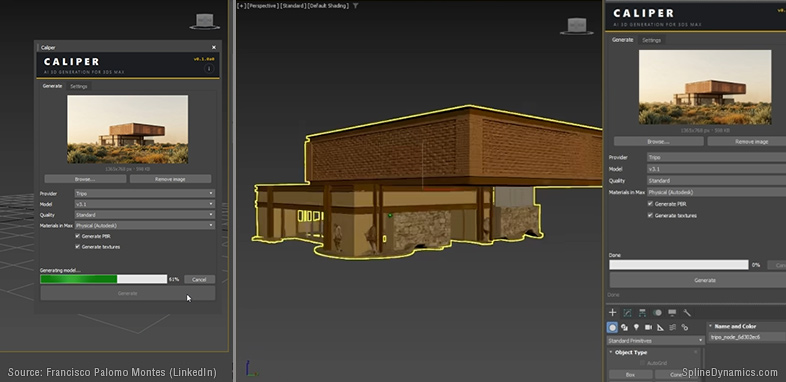
Consider: Francisco Palomo Montes, an architect and visualizer who describes himself explicitly as not a programmer, identified a friction point many DCC users would recognize — the constant context-switching required to use image-to-3D services. Leave the application. Open a browser. Upload the image. Wait. Download the file. Import it. Adjust materials. Repeat for every asset. He built a plugin called Caliper using Claude as a coding assistant, connecting 3ds Max directly to the Tripo AI API and eliminating the steps that broke his concentration. His reflection on the experience: “The interesting thing isn’t the tool itself. It’s what having built it changes: the software went from being something I suffer to something I have control over.”
That shift — from user to builder, without becoming a full software developer — is one of the most meaningful patterns emerging in the technical artist space right now. It’s producing a growing ecosystem of micro-tools, custom integrations, and workflow utilities: built by artists solving their own specific problems, shared quietly in Discord servers and GitHub repositories. Not revolutionary products. Just a lot of small frictions, getting removed.
The implication for the technical artist role is real. The value isn’t shifting from “can write code” to “can prompt AI.” It’s shifting toward understanding the production system well enough to know which problems are worth solving and how to connect the tools that solve them. That kind of knowledge is hard to acquire and hard to replicate. AI can help implement a solution. It doesn’t automatically know which problem needs solving in the first place.
Custom 3ds Max plugin integrating AI-generated 3D assets directly into production workflows.
Where to Start — Practical Orientation for ArchViz Artists and TDs
The instinct when facing a fast-moving landscape is to try to follow all of it. That instinct is worth resisting. The AI tool space changes quickly enough that investing heavily in any specific platform before understanding its production relevance is a reliable way to waste time. A more useful approach: start from your own workflow and work outward.
For most artists, the most practical entry point is already inside the tools they’re using. V-Ray, Corona, Enscape, and D5 Render all have AI-powered features embedded in current versions — denoising, upscaling, material generation, atmosphere matching — with no additional pipeline and minimal learning curve. Understanding what these features actually do in practice, and where the productivity gain is real versus overstated, is more valuable than jumping into a ComfyUI stack on day one.
For concept and brief alignment, AI image generation is genuinely useful — but only with a clear distinction between concept support and production deliverable. Generating ten or twenty visual directions to help a client articulate their aesthetic before significant modeling begins: real value. Using the same tools as substitutes for final controlled deliverables: where professional liability starts to appear. That line is worth drawing clearly.
For technical artists and advanced users, AI-assisted scripting is probably the highest-leverage area to explore right now. Not because every artist needs to build a custom plugin, but because identifying one or two specific workflow friction points and using LLM assistance to address them is a realistic short-term experiment. The key is starting with a clearly defined problem — not “integrate AI” as a general ambition.
And one recommendation that applies across all of the above: don’t abandon traditional 3D skills. The current landscape, if anything, reinforces their value. The artists who understand both structured 3D production and AI-assisted workflows are in a far stronger position than those who have bet on prompts alone. The AI layer needs something reliable to work with. That something is still the 3D pipeline.
A New Production Layer, Not a Replacement
After examining the current state of AI in Architectural Visualization closely — through industry surveys, production workflow documentation, forum discussions, GitHub threads, and the quiet evidence of what actually ships versus what gets demoed — the picture that emerges is not the one that dominates public discourse.
This is not a story of replacement. It’s a story of layering.
AI is becoming an enhancement layer, an acceleration layer, a postproduction layer, a toolmaking layer. It’s inserting itself into the spaces around the traditional ArchViz pipeline and changing how artists move between ideas, images, tools, and deliverables. The 3D scene remains structurally central. What’s growing is the AI-assisted infrastructure that connects it to faster outputs, richer concepts, and more fluid iteration cycles.
The most meaningful innovation may not come from large platforms competing for the prompt-to-image market. It may come from many small, highly specific tools built by people who understand the everyday friction of production. That’s what a production layer looks like from the inside: not a revolution, not a replacement, but a gradual accumulation of specific tools making specific painful tasks less painful.
For ArchViz, this moment carries both genuine opportunity and real risk. The opportunity is compression — of concept time, iteration cycles, postproduction effort, toolmaking barriers. The risk is the normalization of AI outputs in contexts where their limitations aren’t visible to clients but are visible to professionals: the geometry errors, the inconsistent revisions, the deferred problems that accumulate when speed is prioritized over accuracy.
Traditional ArchViz is not disappearing. But the way it gets built, enhanced, and delivered is clearly beginning to change. That change deserves more honest attention than most of the current conversation around it provides.
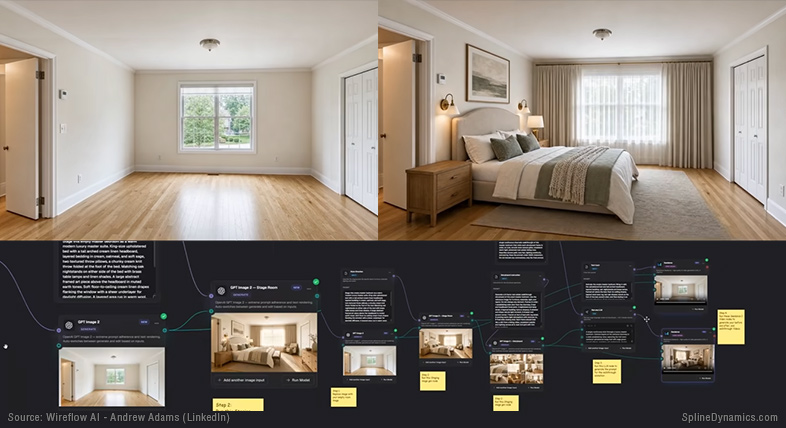
AI-assisted staging and cinematic walkthrough generation from simple text prompts.
Prefer to watch a short video about this?
References & Further Reading
This article draws on a broader research process completed in May 2026.
Industry Reports & Surveys
- Chaos / Architizer State of ArchViz Report 2025, August 2025
- Chaos AI in Architecture Report 2026, early 2026 (survey conducted November 2025)
- Chaos blog: Best AI Rendering Tools for Architects 2026, March 25, 2026
- Chaos blog: The New ArchViz Workflow, April 22, 2026
- Chaos blog: Corona AI Workflow Breakdown (Olena Kamenetska / Moonlight Studio), March 16, 2026
Studio & Practitioner Research
- Ravelin3D: AI in Architectural Visualization 2025–2026: Revolution or Hype?, October 23, 2025
- archicgi.com: Will AI Replace 3D Artists?, March 9, 2026
- 3dground.net: ChatGPT vs Gemini for ArchViz and 3D, May 18, 2026
- archivinci.com: CGI vs AI Rendering, December 12, 2025
Tools & Ecosystems
- Chaos Veras — documentation and release notes
- D5 Render AI features and D5 at Autodesk University 2025
- ComfyUI — GitHub repository
- PH’s Archviz x AI ComfyUI Workflow (CivitAI, November 2024 — updated November 2025)
Open-Source & Development
- GitHub: ADN-DevTech/3dsMax-Python-HowTos (active 2024–2025)
- Apatero.com: ComfyUI troubleshooting documentation (October–November 2025)
- Autodesk Developer Blog: pymxs and 3ds Max SDK notes (through May 2025)
Practitioner Posts (LinkedIn, May 2026)
- Joël Feyaerts (Blacksquid / CGarchitect) — on AI geometry errors in sales-phase renders
- Francisco Palomo Montes — on building the Caliper plugin (3ds Max + Tripo AI API)
- Iván Zabalza González (Señapaula SL) — on hybrid DCC + ComfyUI production workflow
- Chiang Ning (ARBV/PMP) — on “AI for atmosphere, 3D for accuracy”
- Rodrigo Zacharias — on prompt engineering as creative direction
- Chaos V-Ray official — V-Ray 7 AI feature announcement
- Wes McDermott (Adobe Firefly Foundry) — on DCC viewport as AI conditioning input
- Sanmiraa Group — on client decision-making and AI brief alignment
Written by Hernán A. Rodenstein, Founder of Spline Dynamics.
This article is part of an ongoing research and experimentation process around AI-assisted workflows, technical tool development and production automation at Spline Dynamics.
Studios interested in custom 3ds Max tools, workflow automation or pipeline optimization can learn more about our Custom 3ds Max Script Development Services.
Affiliate Disclosure
Some links in this article may be affiliate links. If you decide to purchase through them, we may earn a small commission at no extra cost to you. These commissions help support the creation of free tutorials, articles, and tools on Spline Dynamics. All opinions expressed are our own, and we only recommend products that we believe provide real value to the CG and ArchViz community.
