Posted on Leave a comment

AI-Assisted ArchViz: Beyond the Hype

A grounded look at how AI-assisted workflows, hybrid pipelines and technical artists are reshaping Architectural Visualization production.

Something Is Quietly Changing in ArchViz Pipelines

There’s a version of the AI conversation in ArchViz that lives entirely on social media — dramatic demos, instant photorealism, the promise that prompts will make geometry irrelevant. And then there’s what’s actually happening in production. The two don’t quite match.

What you notice, if you pay attention to the right places — the forums, the GitHub threads, the workflow posts from working artists rather than their polished showcase feeds — is something more specific and more interesting than a revolution. AI is entering real pipelines. Not by replacing them, but by attaching itself to them at particular friction points. The 3D scene still exists. Clients still request revisions. The render still needs to be consistent across eight or twelve coordinated views.

The shift happening right now is quieter than the headlines suggest, and considerably more instructive. This article is an attempt to describe it honestly.

Why ArchViz Is Fertile Ground for AI-Assisted Workflows

Architectural visualization has always demanded more than visual talent. A strong set of deliverables — exteriors, interiors, aerials, close-ups, all coherent and revision-safe — involves a level of technical discipline that sits somewhere between craft and engineering. Scene organization, asset management, material accuracy, lighting setups, render optimization, postproduction, version control: these are the unglamorous realities behind the polished images.

Because of that, the field has always attracted practitioners who care about systems. Long before the current AI cycle, ArchViz had a strong scripting and automation culture. Technical artists were building custom utilities, batch processes, render managers, and specialized plugins. Automation was not a foreign concept. It was survival. AI did not arrive in an industry unfamiliar with toolmaking — it arrived in one that was already hungry for better ways to reduce friction.

At the same time, ArchViz exposes AI’s limitations faster than almost any other discipline. A concept artist can get away with a single compelling image. A professional visualization studio cannot. The requirement for consistency, precision, and revision-safe output isn’t going away — and in many ways, it’s precisely what separates serious architectural visualization from the broader category of “AI-generated architectural imagery.” Those are different things, with different production standards and different professional accountability.

This is what makes ArchViz such a useful lens for understanding where AI actually helps and where it still falls short.

The New Hybrid Pipeline: 3D as Control Layer, AI as Enhancement Layer

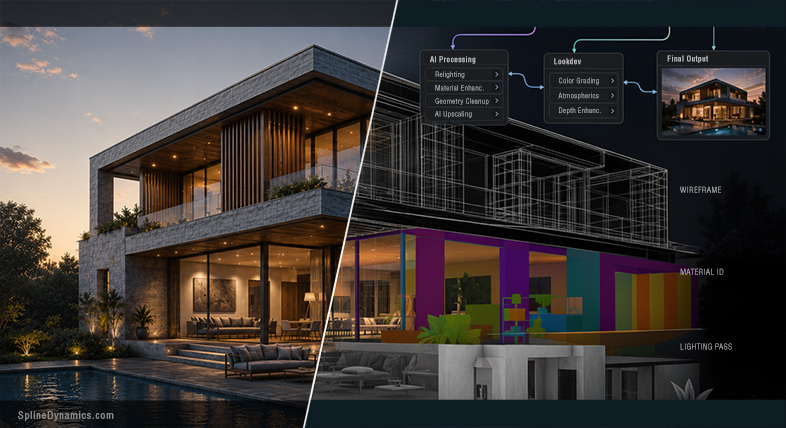
The most honest description of how AI is entering serious ArchViz production isn’t a single tool or a single workflow — it’s a structural pattern. The 3D scene remains the source of truth. Geometry, camera position, proportions, material assignments, scene structure: these still come from the model. What’s changing is what gets built on top of that foundation.

AI is inserting itself at increasingly specific points: concept exploration and moodboard alignment before significant modeling begins, material and texture development, postproduction for denoising and upscaling, inpainting to add entourage without manual placement, atmosphere or relighting work on top of an already-rendered base image. The structure stays intact. The AI layer touches specific outputs at specific moments, guided by the geometry the scene provides.

Hybrid 3D + AI workflow using material IDs and controlled masking for consistent ArchViz outputs.
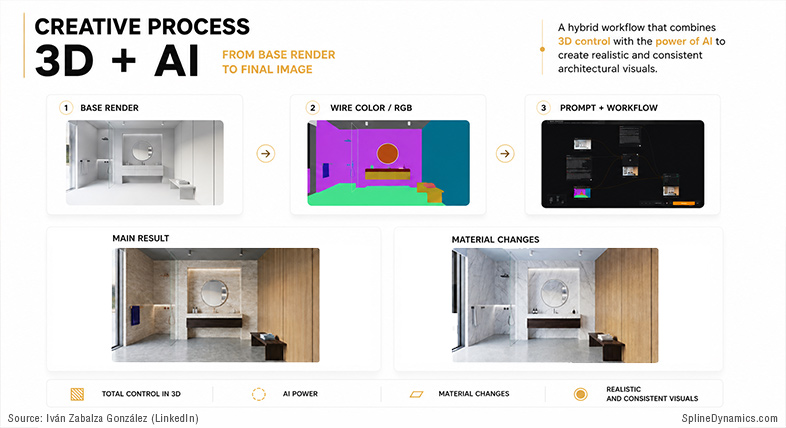
Iván Zabalza González, archViz expert and CEO at Señapaula SL, described his actual production workflow this way: render passes — wirecolor, material IDs — tell the AI precisely which zones correspond to which finish, what materials to apply, where geometry and composition must remain untouched. His assessment: “the system is quite consolidated, works very reliably, and — when well set up — does not fail.” That kind of confidence doesn’t come from a demo. It comes from production repetition.

It’s worth being clear about what this model doesn’t include. Prompt-only generation is not a production workflow for client-facing ArchViz. For projects requiring controlled revisions, consistent multi-view output, and professional accountability — which describes most serious studio work — purely text-driven image generation is still unsuitable as a primary pipeline. That’s not a forecast. It’s a description of where the technology is right now.

The hybrid model also clarifies where the most valuable AI tools actually sit. Not the ones generating the most spectacular standalone images — but the quietest ones: a denoiser that cleans a medium-sample render to delivery quality, a material generator that produces a usable PBR starting point from a reference photo, an upscaler that brings a viewport capture to presentation resolution. These are not headline features. They are workflow compressions. And that’s exactly why they get adopted.

Tools and Ecosystems Worth Watching

Approaching the current AI landscape as a list of tools is a good way to produce content that’s outdated in three months. A more durable approach is to look at ecosystems: the clusters of tools, workflows, and technical patterns forming around specific production problems.

The most immediately relevant ecosystem for professional ArchViz is AI embedded directly in render engines. V-Ray, Corona, and Enscape have all been systematically adding AI features — denoising, upscaling, material generation, atmosphere matching — into products professionals already use and already pay for. The adoption barrier for these features is near zero: they don’t require a new pipeline. They arrive inside the tool you already know.

Closely related is the emerging category of BIM-connected AI rendering. Chaos Veras — available as a plugin for Revit, SketchUp, Rhino, Vectorworks, Archicad, and now bundled with Enscape Premium — grounds AI output in the actual project geometry rather than generating from text prompts alone. The results are still subject to drift at higher creative override settings, but the approach is structurally more compatible with professional architecture workflows than pure prompt-based tools. This category is maturing faster than most.

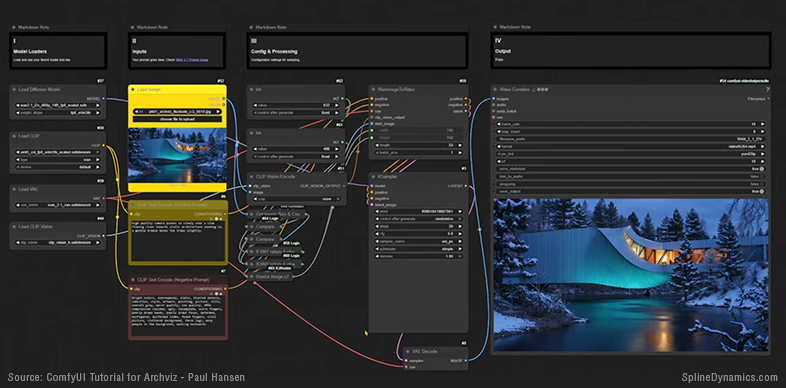
The open-source ecosystem around ComfyUI, ControlNet, and foundation models like FLUX and SDXL occupies a different position: not the most stable, but arguably the one with the highest ceiling for technical artists willing to invest in it. The ability to combine depth passes, material ID masks, style references, and custom generation pipelines in a node-based interface is genuinely powerful — and real workflows are being built here, not just demos.

Image-to-3D tools like Meshy and Tripo deserve a mention, not because they’re production-ready — they aren’t, for most DCC workflows — but because the direction of travel is worth watching. The gap between an impressive-looking mesh in a demo and a production-usable asset with clean topology remains significant. For static background elements, some of these tools are already useful. For anything requiring animation or precision, not yet.

Node-based ComfyUI workflow for AI-assisted architectural visualization and image-to-video generation.
Reality Check — What These Tools Still Can’t Do

The most useful thing this article can do is be honest about the gap between what gets shown and what gets used. That gap is substantial.

The most critical limitation in professional ArchViz is multi-view consistency. A single AI-generated image can be extraordinary. But a real project requires eight to twelve coordinated views of the same building — matching materials, consistent geometry, identical context, and the ability to handle client revisions across the full set. Current generative AI cannot maintain this coherence reliably. Materials shift. Windows appear at different proportions. The building that looks convincing from one angle may have structurally impossible balconies in the next.

Joël Feyaerts, co-founder at Blacksquid and a longtime voice in the CGarchitect community, named this plainly: “The balcony sits two floors higher than on the plan. The railing turns into a wall halfway across. A window that repeats identically in every neighboring unit, because AI does not understand what a grid is. The architects see this. I am sure of that.” And he drew a distinction that deserves wider circulation: “An AI render in the concept phase is exceptional. Faster, cheaper, freer. An AI render in the sales phase, with broken balconies and inconsistent rhythm, is not a workflow. It is a deferred problem.”

The revision workflow problem follows from this. In traditional 3D production, changing a curtain wall color or adjusting a balcony depth propagates from the model through all renders. AI regeneration doesn’t work that way — a revision means regenerating the image, and the elements already approved may not survive intact. For client-facing work with multiple feedback rounds, this is a fundamental limitation.

There’s also what might be called the hidden cleanup economy. The polished AI showcase images rarely reflect the actual effort behind them: the failed generations, prompt iterations, Photoshop corrections for inpainting artifacts, broken nodes, hours spent trying to reproduce a result that worked once. Independent studio research consistently puts realistic workflow acceleration from AI at 20–35% overall — meaningful, but considerably more modest than the 80–90% figures that appear in marketing. The gap is almost entirely explained by invisible work that demos don’t show.

AI-Assisted Development and the New Technical Artist

One of the less discussed consequences of the current AI moment isn’t about image generation at all. It’s about who gets to build tools.

For years, the technical artist in an ArchViz context was constrained by the time and expertise required to build anything substantial from scratch. A useful utility might take days. An API integration with real UI might take weeks. LLMs are changing that calculation — not by replacing programming knowledge, but by compressing the distance between having an idea and having a working prototype. For artists who understand the workflow problem and have enough scripting background to verify the output, the time cost of building a custom tool has dropped significantly.

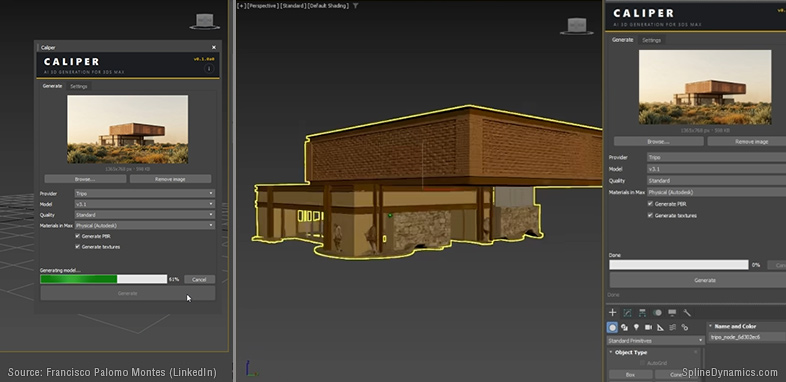
Consider: Francisco Palomo Montes, an architect and visualizer who describes himself explicitly as not a programmer, identified a friction point many DCC users would recognize — the constant context-switching required to use image-to-3D services. Leave the application. Open a browser. Upload the image. Wait. Download the file. Import it. Adjust materials. Repeat for every asset. He built a plugin called Caliper using Claude as a coding assistant, connecting 3ds Max directly to the Tripo AI API and eliminating the steps that broke his concentration. His reflection on the experience: “The interesting thing isn’t the tool itself. It’s what having built it changes: the software went from being something I suffer to something I have control over.”

That shift — from user to builder, without becoming a full software developer — is one of the most meaningful patterns emerging in the technical artist space right now. It’s producing a growing ecosystem of micro-tools, custom integrations, and workflow utilities: built by artists solving their own specific problems, shared quietly in Discord servers and GitHub repositories. Not revolutionary products. Just a lot of small frictions, getting removed.

The implication for the technical artist role is real. The value isn’t shifting from “can write code” to “can prompt AI.” It’s shifting toward understanding the production system well enough to know which problems are worth solving and how to connect the tools that solve them. That kind of knowledge is hard to acquire and hard to replicate. AI can help implement a solution. It doesn’t automatically know which problem needs solving in the first place.

Custom 3ds Max plugin integrating AI-generated 3D assets directly into production workflows.
Where to Start — Practical Orientation for ArchViz Artists and TDs

The instinct when facing a fast-moving landscape is to try to follow all of it. That instinct is worth resisting. The AI tool space changes quickly enough that investing heavily in any specific platform before understanding its production relevance is a reliable way to waste time. A more useful approach: start from your own workflow and work outward.

For most artists, the most practical entry point is already inside the tools they’re using. V-Ray, Corona, Enscape, and D5 Render all have AI-powered features embedded in current versions — denoising, upscaling, material generation, atmosphere matching — with no additional pipeline and minimal learning curve. Understanding what these features actually do in practice, and where the productivity gain is real versus overstated, is more valuable than jumping into a ComfyUI stack on day one.

For concept and brief alignment, AI image generation is genuinely useful — but only with a clear distinction between concept support and production deliverable. Generating ten or twenty visual directions to help a client articulate their aesthetic before significant modeling begins: real value. Using the same tools as substitutes for final controlled deliverables: where professional liability starts to appear. That line is worth drawing clearly.

For technical artists and advanced users, AI-assisted scripting is probably the highest-leverage area to explore right now. Not because every artist needs to build a custom plugin, but because identifying one or two specific workflow friction points and using LLM assistance to address them is a realistic short-term experiment. The key is starting with a clearly defined problem — not “integrate AI” as a general ambition.

And one recommendation that applies across all of the above: don’t abandon traditional 3D skills. The current landscape, if anything, reinforces their value. The artists who understand both structured 3D production and AI-assisted workflows are in a far stronger position than those who have bet on prompts alone. The AI layer needs something reliable to work with. That something is still the 3D pipeline.

A New Production Layer, Not a Replacement

After examining the current state of AI in Architectural Visualization closely — through industry surveys, production workflow documentation, forum discussions, GitHub threads, and the quiet evidence of what actually ships versus what gets demoed — the picture that emerges is not the one that dominates public discourse.

This is not a story of replacement. It’s a story of layering.

AI is becoming an enhancement layer, an acceleration layer, a postproduction layer, a toolmaking layer. It’s inserting itself into the spaces around the traditional ArchViz pipeline and changing how artists move between ideas, images, tools, and deliverables. The 3D scene remains structurally central. What’s growing is the AI-assisted infrastructure that connects it to faster outputs, richer concepts, and more fluid iteration cycles.

The most meaningful innovation may not come from large platforms competing for the prompt-to-image market. It may come from many small, highly specific tools built by people who understand the everyday friction of production. That’s what a production layer looks like from the inside: not a revolution, not a replacement, but a gradual accumulation of specific tools making specific painful tasks less painful.

For ArchViz, this moment carries both genuine opportunity and real risk. The opportunity is compression — of concept time, iteration cycles, postproduction effort, toolmaking barriers. The risk is the normalization of AI outputs in contexts where their limitations aren’t visible to clients but are visible to professionals: the geometry errors, the inconsistent revisions, the deferred problems that accumulate when speed is prioritized over accuracy.

Traditional ArchViz is not disappearing. But the way it gets built, enhanced, and delivered is clearly beginning to change. That change deserves more honest attention than most of the current conversation around it provides.

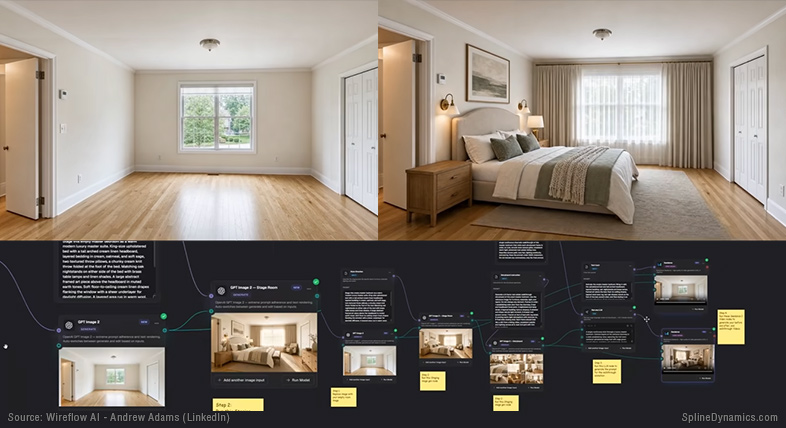
AI-assisted staging and cinematic walkthrough generation from simple text prompts.
References & Further Reading

This article draws on a broader research process completed in May 2026.

Industry Reports & Surveys

Studio & Practitioner Research

Tools & Ecosystems

Open-Source & Development

  • GitHub: ADN-DevTech/3dsMax-Python-HowTos (active 2024–2025)
  • Apatero.com: ComfyUI troubleshooting documentation (October–November 2025)
  • Autodesk Developer Blog: pymxs and 3ds Max SDK notes (through May 2025)

Practitioner Posts (LinkedIn, May 2026)

  • Joël Feyaerts (Blacksquid / CGarchitect) — on AI geometry errors in sales-phase renders
  • Francisco Palomo Montes — on building the Caliper plugin (3ds Max + Tripo AI API)
  • Iván Zabalza González (Señapaula SL) — on hybrid DCC + ComfyUI production workflow
  • Chiang Ning (ARBV/PMP) — on “AI for atmosphere, 3D for accuracy”
  • Rodrigo Zacharias — on prompt engineering as creative direction
  • Chaos V-Ray official — V-Ray 7 AI feature announcement
  • Wes McDermott (Adobe Firefly Foundry) — on DCC viewport as AI conditioning input
  • Sanmiraa Group — on client decision-making and AI brief alignment

Written by Hernán A. Rodenstein, Founder of Spline Dynamics.

This article is part of an ongoing research and experimentation process around AI-assisted workflows, technical tool development and production automation at Spline Dynamics.

Studios interested in custom 3ds Max tools, workflow automation or pipeline optimization can learn more about our Custom 3ds Max Script Development Services.


Affiliate Disclosure
Some links in this article may be affiliate links. If you decide to purchase through them, we may earn a small commission at no extra cost to you. These commissions help support the creation of free tutorials, articles, and tools on Spline Dynamics. All opinions expressed are our own, and we only recommend products that we believe provide real value to the CG and ArchViz community.

Share
Posted on Leave a comment

AI-Powered Workflows in 3D Graphics: Tools and Insights for 3ds Max Users

Introduction

Artificial Intelligence (AI) has become a transformative force in the field of 3D graphics, revolutionizing how artists and professionals approach modeling, texturing, rendering, and animation. Beyond mere automation, AI tools empower creators to move beyond repetitive tasks, focusing instead on innovation and artistry.

This technological shift is evident across industries such as gaming, architecture, animation, and product design, where efficiency and creative potential have reached unprecedented levels. For example, AI algorithms can interpret rough sketches and transform them into fully realized 3D models. Similarly, real-time lighting simulations, photorealistic material creation, and AI-driven denoisers are reshaping how projects are conceptualized and executed.

This article explores the practical integration of AI tools in the world of 3D graphics. Through real-world examples and workflow breakdowns, you’ll discover how professionals are leveraging AI to overcome traditional challenges, streamline complex tasks, and unlock new creative possibilities.

AI-Enhanced Workflows in 3D Graphics

The integration of Artificial Intelligence into 3D graphics workflows represents a fundamental shift in how projects are conceived, executed, and delivered. AI tools are reshaping traditional processes by automating complex tasks, predicting outcomes, and enhancing creative control. Below are key examples that highlight how AI is transforming workflows across different stages of 3D production:

AI-Assisted Modeling and Asset Creation

Instead of manually building intricate assets, AI tools enable artists to generate 3D models directly from text prompts or reference images. For example, an artist can input a description like “futuristic skyscraper with reflective glass surfaces,” and the AI generates a base model ready for refinement. This accelerates the prototyping phase, freeing artists to focus on creative decisions rather than repetitive modeling tasks.

Procedural Animation with AI

AI algorithms are revolutionizing animation workflows, particularly in crowd simulations and character rigging. Tools like Cascadeur predict natural movement patterns and allow animators to fine-tune physics-driven motions with minimal manual adjustments. This approach ensures high-quality animations while significantly reducing time investment.

Intelligent Scene Optimization

Managing large-scale scenes can be challenging, especially with high-polygon assets. AI-powered plugins analyze scene complexity, identify geometry inefficiencies, and optimize polygon counts. This results in improved viewport responsiveness and smoother workflows, particularly in architectural visualizations and large animation projects.

AI-Driven Texturing and Material Creation

AI tools now offer advanced texturing capabilities, enabling artists to create hyper-detailed materials with accurate environmental interactions. These tools streamline UV mapping and texture application, resulting in more lifelike and visually rich 3D assets.

Smart Rendering Solutions

Rendering engines now integrate AI-driven denoisers to cut down render times while maintaining exceptional image quality, even with low-sample renders. This advancement not only reduces production time but also allows for iterative adjustments, fostering experimentation and refinement in the final output.

Incorporating these AI-enhanced workflows not only saves time but also unlocks opportunities for iterative design, encouraging artists to push creative boundaries and explore new horizons in 3D graphics production.

Real-World Use Cases of AI and 3ds Max in the 3D Graphics Industry

Simplifying Complex Modeling

Zaha Hadid Architects (ZHA) leverages generative AI tools like Midjourney and Gendo to rapidly create multiple design options. These AI-generated base models are then refined using 3ds Max, reducing rendering times by up to 80%.

This approach enables designers to focus on intricate artistic details while AI handles repetitive modeling tasks. As a result, ZHA achieves accelerated design processes, improved creativity, and a competitive edge in project acquisition.
Source: dezeen

Scene Optimization for Architecture

Woods Bagot integrates NVIDIA’s Omniverse platform with 3ds Max to enhance real-time collaboration and streamline scene optimization. This setup facilitates architectural simulations with seamless updates across different tools, reducing manual synchronization errors and saving valuable time.
The result is faster design iterations, improved project outcomes, and greater client satisfaction through an integrated and collaborative workflow.
Source: NVIDIA

Fast and Realistic Animation

Independent animation studios increasingly adopt AI-assisted tools like Cascadeur to automate rigging and refine motion adjustments. Animators use Cascadeur to generate physics-driven keyframes, refine them in 3ds Max, and then export them to engines like Unreal Engine.
This hybrid approach significantly reduces manual animation workloads while maintaining high-quality results, empowering artists to focus on the creative aspects of their work.
Source: Cascadeur

Reducing Render Times

Visualization artists are utilizing AI-powered rendering tools integrated with 3ds Max to expedite rendering during schematic design phases. Plugins like TyFlow’s tyDiffusion leverage AI to optimize rendering tasks, enabling rapid visual feedback and reduced computational overhead.
This workflow not only meets tight deadlines but also encourages creative experimentation without compromising image quality.
Source: TyFlow

Creating Photorealistic Materials

Platforms like D5 Render employ AI to convert photographs into highly detailed materials. These AI-generated materials are then applied in 3ds Max to produce photorealistic visualizations across industries such as gaming and architecture.
This streamlined process enhances visual fidelity, minimizes manual texturing effort, and accelerates material creation workflows.
Source: D5 Render

These real-world examples highlight how AI, in tandem with 3ds Max, is transforming design pipelines across diverse fields. From architectural marvels to intricate animations, AI tools are redefining what’s possible in the world of 3D graphics.

3D Modeling and Asset Creation

3D modeling is the cornerstone of digital content creation, and AI is revolutionizing this process by simplifying complex workflows and enhancing creative control. With the ability to generate intricate models from simple prompts or images, AI-powered tools empower artists to focus on design rather than repetitive manual tasks. This section introduces key tools that are redefining how 3D assets are conceptualized and produced.

  • 3DFY.ai
    AI-powered platform designed for 3D professionals to generate high-quality 3D models directly from images or textual descriptions. It leverages advanced algorithms to automate the modeling process, enabling rapid prototyping and asset creation for games, animations, and visualizations. Ideal for streamlining workflows, it delivers detailed and customizable models with minimal effort.
  • Polycam
    A versatile 3D capture tool that allows professionals to create detailed 3D models and environments using photos or LiDAR scans from mobile devices. It simplifies photogrammetry workflows, producing high-quality, shareable models for use in gaming, visualization, and design. Ideal for rapid asset creation, it’s a powerful tool for creative and technical applications.
  • Luma AI
    Cutting-edge platform for 3D professionals that uses AI and photogrammetry to transform photos or videos into detailed 3D models and scenes. It enables the creation of photorealistic assets and environments with minimal effort, making it ideal for gaming, VFX, and architectural visualization. Its powerful tools simplify complex workflows while delivering high-quality results.
  • GET3D
    GET3D by NVIDIA is an AI-powered research project that generates high-quality, textured 3D models from random noise, optimized for 3D professionals. It uses generative adversarial networks (GANs) to create diverse assets like characters, vehicles, and buildings with clean topology and rich textures. Ideal for gaming, simulation, and virtual environments, it accelerates content creation for creative workflows.

Animation and Motion Capture

Animation has always been a labor-intensive process, requiring meticulous attention to detail and significant time investment. AI is changing the game by automating tasks like rigging, motion capture, and keyframe animation, while maintaining creative control. In this section, we’ll explore tools that simplify complex animation workflows, enabling artists to create lifelike movements and dynamic scenes with unprecedented efficiency.

  • DeepMotion
    Specializes in creating high-quality motion animations from video input, making it an essential tool for character rigging and real-time production workflows. Its advanced capabilities streamline the animation process, allowing professionals to achieve lifelike movements efficiently.
  • Cascadeur
    AI-assisted keyframe animation software that enables artists to create realistic character animations without relying on traditional motion capture. Its physics-based approach allows for intuitive animation creation, making it particularly effective for action scenes and complex character movements.
  • RADiCAL
    Leverages AI for advanced motion tracking and animation generation, providing professionals with a powerful alternative to conventional motion capture setups. This tool enhances workflow efficiency and allows for high-quality animations using video references.
  • Rokoko Video
    Offers real-time motion capture from 2D videos, enabling animators to quickly produce realistic movements for 3D characters. This tool is particularly useful in professional environments where rapid iteration and prototyping are necessary.
  • Kinetix
    Transforms video footage into animated 3D characters, streamlining the previsualization process for professionals in various industries. Its ability to quickly generate animations from existing footage makes it a valuable asset for studios looking to enhance their production efficiency.

Virtual Worlds and Environment Building

Creating expansive and immersive virtual environments has traditionally been a resource-heavy task. AI tools are now streamlining this process, allowing artists to generate large-scale virtual worlds with intricate details faster and more efficiently. This section highlights tools that empower creators to design dynamic and visually rich environments, bridging the gap between imagination and execution.

  • Project Scenic
    Introduced at Adobe MAX 2024, is an experimental tool that allows users to generate 2D images by creating and editing 3D scene layouts through text prompts. It enables precise control over object placement and camera angles, simplifying the design process and reducing trial-and-error. While still in the research phase, it hints at future integration into Adobe’s creative tools.
  • World Labs:
    Develops Large World Models (LWMs), leveraging AI to generate and interact with detailed 3D environments from minimal inputs like text descriptions or single images. Its technology focuses on spatial intelligence and simulation, enabling the creation of complex virtual worlds suitable for gaming, virtual production, and interactive applications. The platform emphasizes efficiency and flexibility, allowing professionals to build and refine highly detailed environments for real-time and pre-rendered workflows.
  • Lumalabs:
    Luma Labs’ Dream Machine is an AI-driven tool that generates high-quality, realistic videos from text and image prompts. It enables the rapid creation of dynamic virtual environments, capturing smooth motion and consistent character interactions. This technology is particularly beneficial for professionals in the 3D graphics industry, facilitating efficient development of immersive content for applications such as gaming, virtual production, and interactive media.

Creation of Materials, Textures, and Unwrapping

Materials and textures play a crucial role in achieving realism and visual quality in 3D projects. AI-powered tools simplify UV mapping, texture generation, and material application, allowing artists to create highly detailed and physically accurate surfaces with minimal manual intervention. This section explores AI tools that redefine how materials are crafted and integrated into 3D workflows.

  • Substance 3D Sampler
    Allows artists to transform real-world photographs into seamless, high-quality materials suitable for PBR (Physically Based Rendering) workflows. It provides extensive control over texture properties, enabling professionals to create realistic surfaces that enhance the visual quality of their projects. This tool is essential for those who demand precision and creativity in material design.
  • Quixel Mixer
    This is a powerful tool that merges scanned textures with procedural techniques, offering artists the ability to craft highly customizable and detailed materials. Ideal for architectural visualization and cinematic scenes, it enables professionals to integrate realistic elements seamlessly into their projects. Its user-friendly interface combined with advanced capabilities makes it a favorite among industry experts.
  • ArmorLab
    AI-driven software for creating PBR (Physically-Based Rendering) textures from images, tailored for 3D artists and professionals. It streamlines texture creation by allowing users to generate seamless maps like diffuse, normal, roughness, and more, directly from reference images, eliminating the need for complex workflows. Its intuitive interface and efficient automation make it an excellent tool for enhancing materials in 3D projects, especially for game development and visualization.
  • Polycam
    Specializes in capturing high-quality textures from real-world objects using photogrammetry techniques. This tool enables professionals to create unique materials that can be used in game assets or architectural visualizations, providing a level of detail that enhances realism. Its ability to convert physical textures into digital formats makes it an essential resource for artists looking to push the boundaries of their work.

Rendering

Rendering remains one of the most resource-intensive stages of 3D production. AI-driven rendering tools are addressing this challenge by reducing render times, optimizing resource allocation, and enhancing image quality. This section delves into tools that combine speed, efficiency, and precision to deliver exceptional rendering results, even under tight deadlines.

  • V-Ray AI Denoiser
    Advanced tool that significantly reduces noise in rendered images, enhancing the overall quality while cutting down rendering times by up to 50%. It operates on existing render elements, allowing for adjustments without the need for re-rendering, which is crucial for professionals who require efficiency in their workflows. This tool integrates seamlessly with various 3D applications, making it a favorite among visual effects artists and architects.
  • OctaneRender AI
    A powerful GPU-based rendering engine that utilizes artificial intelligence to accelerate ray tracing processes, resulting in faster and more photorealistic renders. Professionals in the visual effects and animation industries benefit from its high-quality output and real-time rendering capabilities, which are essential for creating intricate scenes and animations. Its compatibility with multiple 3D software packages further solidifies its position as a professional-grade tool.
  • NVIDIA Omniverse
    A collaborative platform for 3D professionals, enabling seamless real-time collaboration and simulation across industries. Built on Universal Scene Description (USD), it connects tools like 3ds Max, Maya, and Unreal Engine, streamlining workflows for design, animation, and visualization. With AI-powered tools and photorealistic rendering, it empowers creators to build, iterate, and innovate faster.

Postproduction and Visual Enhancement

Postproduction is the final step where visuals are polished and refined, and AI is playing a transformative role in this stage. From noise reduction and color grading to object removal, AI tools simplify complex editing tasks, enabling artists to focus on delivering cinematic-quality results. This section showcases how AI-driven postproduction tools elevate the final output of 3D projects.

  • Topaz Video Enhance AI
    Designed for enhancing rendered videos, Topaz Video Enhance AI employs advanced algorithms to upscale video resolution and reduce noise. This tool is ideal for professionals seeking to produce cinematic-quality results, making it a valuable asset in postproduction workflows where detail and clarity are paramount.
  • Runway AI
    Offers a comprehensive suite of AI-powered tools tailored for video editing and postproduction. Its capabilities include object removal and color correction, which can significantly streamline the editing process for professionals. This tool is particularly useful for those in the film and animation industries who require efficient and high-quality video enhancements.
  • DaVinci Resolve AI
    Integrates advanced AI tools into its professional-grade video editing, color grading, and post-production suite. Features like smart object removal, scene detection, and AI-assisted color matching streamline workflows for editors and VFX artists. Ideal for crafting high-quality visuals, it enhances precision and creativity while saving time on complex tasks.
  • Adobe Premiere Pro
    A powerful video editing software that features advanced AI-driven tools ideal for 3D graphics professionals. Its capabilities include Smart Masking for precise object tracking, Generative Extend for adding frames, and Object Removal for seamless edits. Additionally, the Enhance Speech tool improves dialogue quality, while text-based editing streamlines navigation and editing of lengthy content, optimizing the post-production workflow.
  • Wonder Studio
    Innovative AI-powered tool designed to automate the animation, lighting, and compositing of CG characters into live-action scenes. By processing single-camera footage, it can detect actor movements and automatically animate corresponding 3D characters, significantly reducing the time and resources typically required for VFX production. This makes it an invaluable asset for professionals in the film and gaming industries looking to streamline their workflows while maintaining high-quality outputs.

Interior and Architectural Design

In the field of architectural visualization and interior design, AI tools are revolutionizing how spaces are conceptualized, optimized, and presented. These tools enable rapid exploration of design options, efficient layout generation, and photorealistic visualizations. This section highlights AI solutions that are empowering architects and designers to deliver impactful and functional designs with precision and speed.

  • InteriorAI
    AI-powered tool for interior design professionals and enthusiasts, enabling quick visualization and redesign of spaces from photos. It generates realistic design concepts across various styles, making it ideal for planning, presenting, or exploring creative ideas. With its intuitive interface, it simplifies the design process and enhances creativity.
  • Decor8 AI
    Offers AI-powered layout and interior design suggestions tailored for architects and designers. This tool enables rapid exploration of various design concepts, allowing professionals to iterate quickly and efficiently. By leveraging AI to optimize design layouts, Decor8 AI enhances creativity and productivity in the architectural design process.
  • Autodesk Forma
    BIM software powered by AI, designed for architects and urban planners to optimize early-stage design workflows. It offers tools to analyze environmental factors, energy performance, and site conditions, enabling data-driven decision-making. Ideal for sustainable and efficient projects, it streamlines conceptual planning and enhances outcomes.

AI-Powered Plugins for 3ds Max

While 3ds Max is already a powerful tool, its capabilities are further extended through AI-powered plugins. These plugins optimize processes such as procedural modeling, texturing, and rendering, providing smarter workflows and faster results. This section introduces key AI plugins designed to seamlessly integrate with 3ds Max, enhancing productivity and creative flexibility.

  • TyFlow
    A powerful plugin for 3ds Max that enables artists and animators to create intricate particle simulations and visual effects. The recent addition of the tyDiffusion module integrates AI capabilities using Stable Diffusion, allowing users to generate high-quality images and animations that are contextually aware of the 3D scene. This feature enhances creative control by enabling artists to direct the AI in generating textures and visual elements that seamlessly fit their designs, significantly streamlining the artistic workflow.
  • Anima
    Specializes in crowd simulation and intelligent character placement. This plugin employs AI algorithms to populate large architectural scenes with animated characters that move and interact realistically. By analyzing the environment and context, Anima intelligently places characters in a way that enhances the scene’s believability, saving time for artists who would otherwise need to manually animate each character.
  • Substance 3D Plugin
    Integrates AI-assisted material generation and pattern recognition into 3ds Max. This tool allows users to create seamless textures efficiently by leveraging AI to analyze existing materials and generate new ones based on user-defined parameters. The result is a streamlined workflow for texture application that enhances both creativity and productivity.
  • V-Ray, Corona Renderer, Chaos Vantage
    These tools feature AI-powered noise reduction that enhances image quality while minimizing computational resources. Using machine learning algorithms, they efficiently reduce noise artifacts, delivering cleaner outputs with fewer samples. V-Ray and Corona excel in both final renders and previews, ideal for architectural and product visualization, while Chaos Vantage focuses on real-time rendering for smooth, interactive scene exploration.
  • Phoenix FD
    A fluid dynamics simulation plugin enhanced with AI capabilities for smoke and fire simulations. The AI optimizes calculations related to fluid behavior, allowing for more lifelike effects while reducing computational load. This results in faster simulations without sacrificing quality, making Phoenix FD a go-to solution for artists looking to create realistic environmental effects.
  • NVIDIA OptiX Denoiser
    The NVIDIA OptiX Denoiser is an AI-powered denoising solution integrated into the NVIDIA OptiX ray tracing engine and supported in 3ds Max through its Arnold and V-Ray renderers. It leverages neural networks to remove noise from rendered images in real-time, enabling faster previews and high-quality outputs. This makes it a valuable tool for 3ds Max users, enhancing productivity in workflows like visualization, animation, and VFX.

Conclusion

The rise of Artificial Intelligence in 3D graphics has redefined not only technical workflows but also the creative boundaries of digital design. From automating asset creation and refining procedural animation to optimizing rendering and streamlining postproduction, AI has embedded itself into nearly every stage of the creative process.

Far from replacing human creativity, AI tools serve as powerful allies, empowering artists and designers to focus on innovation rather than repetitive tasks. Professionals who embrace these tools are not merely adapting to industry trends—they are actively shaping the future of 3D graphics.

As AI technologies continue to advance, the synergy between human intuition and machine intelligence will only grow stronger. Whether you’re crafting an architectural masterpiece, animating complex character movements, or designing immersive virtual worlds, AI is now an indispensable companion in achieving excellence and pushing the limits of what’s possible.

Share