Black Friday 2025: Get 30% OFF All 3ds Max Plugins!

Black Friday is here — and it’s the perfect time to upgrade your 3ds Max toolkit!

From November 24 to December 3, you can get 30% OFF all SplineDynamics plugins or commercial scripts.

Use this coupon code: black30

This discount applies to every product on the site (except bundles), so it’s a great opportunity to grab the tools you’ve been wanting at a reduced price.

Whether you work in modeling, animation, archviz, motion graphics, VFX, or technical visualization, our plugins are designed to boost your workflow and save you hours of production time inside Autodesk 3ds Max.

Don’t miss out — the offer is available only for a limited time!

Go Shopping!

Share

New Features in 3D Measure Master

3D Measure Master is getting better and better!

These highly requested features were implemented in versions 1.10 to 1.12:

  • Multi-Tape Bounding Box. Generates an independent tape measure for each dimension of an object. Fully customizable.
  • Custom Text Notes. Write annotations in the measurement text, either replacing or accompanying the numeric value.
  • Text Thickness Parameter. Control the thickness of TextPlus labels for perfect visual balance.
    Measure, annotate, and present your 3D scenes with true CAD-style precision — directly inside Autodesk 3ds Max.
  • Added 3 new imperial unit formats: Decimal Inches, Inches (1/8″ fractions), and Feet + Inches (1/8″ fractions).
  • Implemented an automatic updater that detects and updates measurement objects created with older versions of the script, to maximize backwards compatibility.

Get the plugin here: 3D Measure Master

Share

3D Measure Master released – CAD-Style 3D Measurement Tools for 3ds Max

We’re proud to announce the release of 3D Measure Master, a professional plugin that brings true CAD-style precision to Autodesk 3ds Max.
This toolset allows you to measure anything directly in your scene — distances, angles, radii, diameters, and object dimensions — all represented as editable, renderable 3D geometry.

With five specialized tools, intuitive snapping, and a clean CAD-style visual output, 3D Measure Master makes it easy to create accurate, presentation-ready measurements. Perfect for architectural visualization, product design, technical modeling, and industrial visualization.

You can customize every aspect of your measurements, from spline color and thickness to text style, end markers, and units.
Finally, export all your data to CSV for documentation or collaboration.
Bring precision, clarity, and professionalism to your 3ds Max scenes with 3D Measure Master — available now at SplineDynamics.com.

Lear more & Get the product here: 3D Measure Master

Share

New Swimming Pool Generator for 3ds Max

We’re excited to share a brand-new tool for 3D artists, especially those in architectural visualization and exterior design:
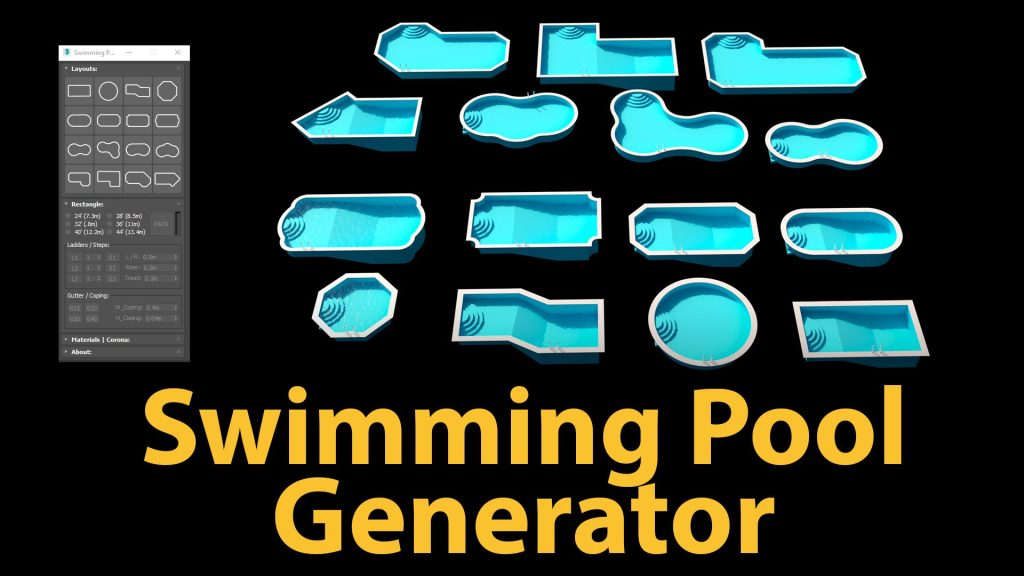
Introducing the Swimming Pool Generator – developed by our partner ArchViz Tools -, a powerful script that lets you easily create detailed, realistic swimming pool models directly inside 3ds Max.

Whether you’re designing a modern backyard, a hotel courtyard, or a luxurious resort, this tool helps you add high-quality pools to your scenes in just seconds.

Features:

  • Choose from 16 professional pool styles
  • Easily customizable dimensions and layout
  • Perfect for residential, commercial, and landscaping projects
  • Saves hours of manual modeling work
  • Compatible with your current scenes and workflows
  • Works with 3ds Max 2018 and later
  • Supports V-Ray and Corona Renderer

Swimming Pool Generator is a must-have for artists looking to speed up their production without sacrificing quality.
Don’t miss this time-saving tool! It’s ready to transform your ArchViz projects!

Get it here: Swimming Pool Generator

Share

Overnight Batch Render v1.5 – Full Render Elements Support for 3ds Max

Big news!
Overnight Batch Render v1.5
 introduces full support for Render Elements, compatible with V-Ray, Corona, FStorm, Arnold, and Scanline — across all rendering modes: Scene States, State Sets, multiple cameras, and multi-scene queues.

You can now override Render Elements globally from a single interface, whether you’re rendering multi-channel EXRs or separate image files.

Ideal for workflows that require consistent render passes across multiple scenes — such as architectural visualization, product rendering, animation sequences, or standarized postproduction.

Get it here: Overnight Batch Render

Share