Launch offer: 30% off Spline Cleaner 2 until October 25, 2026.
Already own v1.x? Your 50% upgrade discount applies on top. See your upgrade options
Clean, repair and organize thousands of splines in no time!
Stop hunting for spline errors. See exactly where they are. Check out the new features in version 2!
Description
Spline Cleaner is an advanced batch processing tool for cleaning, repairing and managing spline curves in Autodesk 3ds Max.
Whether you need to clean up CAD imports, repair vector curves or prepare splines for extrusion, this tool saves you hours of manual work and ensures clean, error-free geometry. Perfect for architectural plans, animation paths, terrain contour lines, logos, vector text, or any spline-based 3D model or project.
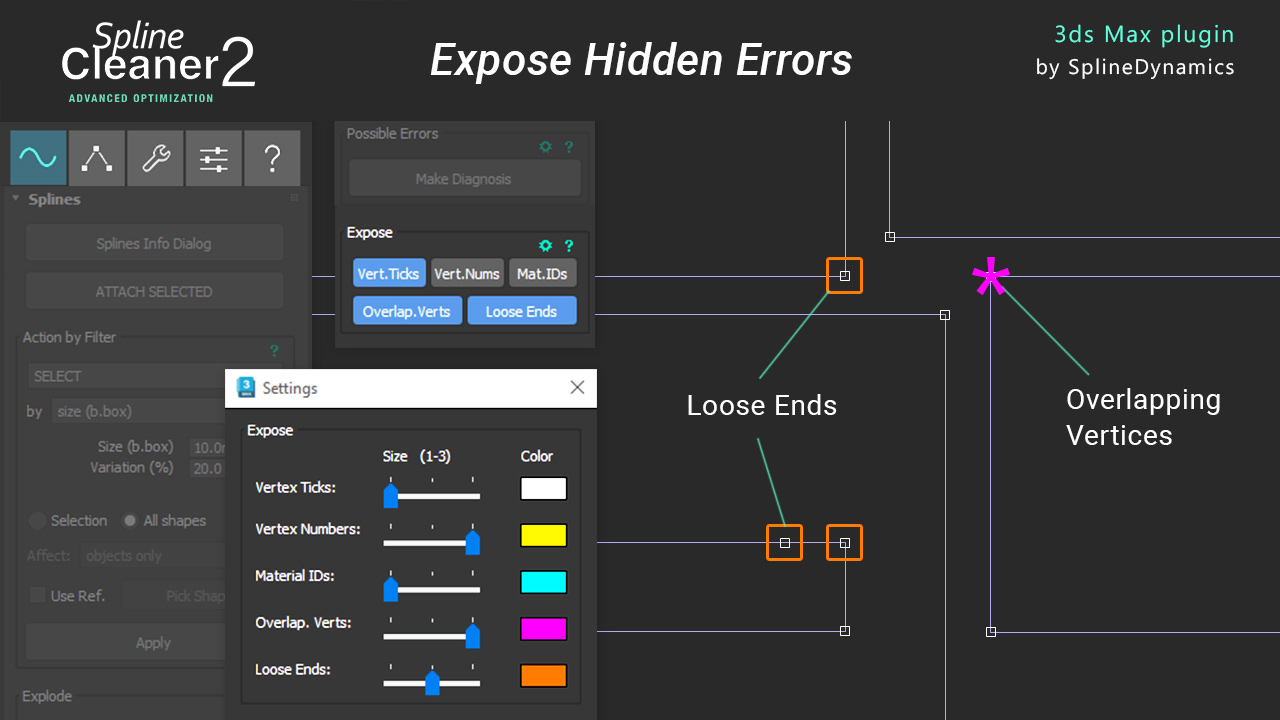
When an Extrude fails or a CAD outline refuses to close, finding the culprit can mean inspecting vertices one by one. Spline Cleaner 2 highlights loose ends and overlapping vertices directly in the viewport, showing you exactly where to look. Once the problem areas are exposed, you can fix them using the its powerful batch tools.
Spline Cleaner is a commercial script for 3dsMax 2015 and higher.
This is a great time-saving tool for artists and professionals in Architectural Visualization, CG Animation, 3D Design, Game Art, Motion Graphics, VFX and Industrial Design.

What’s New in Spline Cleaner 2
Fully Redesigned Interface. Organized into tabs, so you spend less time searching through rollouts and have everything closer at hand.
Expose Loose Ends. Instantly marks the disconnected endpoints of open splines directly in the viewport. These stray vertices are a common cause of extrusion problems.
Expose Overlapping Vertices. Highlights overlapping vertices within each spline, making it easier to identify potential issues and fix them.
Adjustable Marker Size. Native 3ds Max markers for vertex numbers are tiny. Now you can choose from three predefined sizes for vertex ticks, vertex numbers, material IDs, loose ends, and overlapping vertices.
Better Overlap Detection & Repair. Overlapping vertices are now detected within each spline to avoid false positives, and overlapping spline removal is more accurate.
Features
CORE FUNCTIONS
- Remove Duplicate Splines
Automatically detect and delete duplicate spline shapes or overlapping segments to clean up messy scenes. - Delete Isolated Vertices
Identify and remove stray vertices that don’t belong to any spline. Remove empty shapes with no splines. - Close Open Splines
Fix gaps in spline shapes to prepare them for extrusion or further modeling. - Simplify Curves
Optimize straight lines and reduce unnecessary vertices on curves while preserving their original shape. - Change Spline Direction
Ensure all spline curves are oriented consistently to avoid modeling issues later.
WORKFLOW OPTIMIZATION
- Batch Processing
Apply cleaning operations to multiple splines simultaneously for maximum efficiency. - Auto-Weld Vertices
Automatically join overlapping vertices within a specified tolerance. - Flatten Splines
Project all spline points to a single plane for easier 2D editing. - Filter Splines by Properties
Easily isolate splines based on properties like open/closed status, curve length or vertex count.
ADVANCED TOOLS
- Segment Optimization
Adjust spline segmentation to improve performance without compromising accuracy. Smart Normalize function. - Error Reporting
See detailed reports, find issues and highlight problematic splines in your scene. - Expose tools
Show 2D markers on screen to reveal vertex ticks, vertex numbers, material IDs, loose ends, and overlapping vertices. - Support for Materials
Preserve spline materials and material IDs in all operations. - Customizable Settings
Fine-tune cleaning parameters to match your project’s specific needs.
Already using Spline Cleaner v1.x?
You can upgrade to v2 at 50% off. And if you bought your license recently, the upgrade is free.
Your v1.x license stays valid either way.
→ See your upgrade options & benefits
More Info
Check out the Tutorials and Plugin Manual for examples and further information.
3dsMax version required: 2015 or higher.
Last update: October 6, 2026
Purchase / Try
Find errors. Fix them. Get back to modeling.
Try Spline Cleaner free for 10 days on your own files, or get your license now to unlock its full potential.
Or get the trial version.
This is a fully functional 10-day trial, with the following restriction: it will let you manage up to 300 shapes / 10,000 splines maximum at a time.

Get All Spline Tools at Once — 40% OFF
5 professional plugins. One purchase. Lifetime access.
