
Tailored solutions that save time, reduce repetitive work, and improve production processes.
At some point, many 3ds Max setups start to feel heavier than they should.
Not because the work is especially complex, but because too much of it is manual: importing geometry, cleaning up CAD data, renaming objects, fixing material assignments, reorganizing scenes. The same steps, repeated every project.
Over time, those small tasks accumulate into hours every week — sometimes into days every month.
Here’s a simple example of how a purpose-built tool can simplify one of those processes. In this case, the goal was to generate complex camera rigs and multiple viewpoints automatically from existing scene geometry, turning a time-consuming setup into a task that takes only a few clicks.
While this example comes from product visualization, the same principle applies across many production environments. Whether the challenge involves cameras, materials, measurements, render setups, or data processing, the right tool helps teams spend less time managing technical details and more time focused on the work that requires skill and creativity.
With over 10 years of experience building production tools for 3ds Max environments — from MaxScript utilities to Python development and integrations with external platforms and services — we help studios identify bottlenecks and build practical solutions around the way they work.
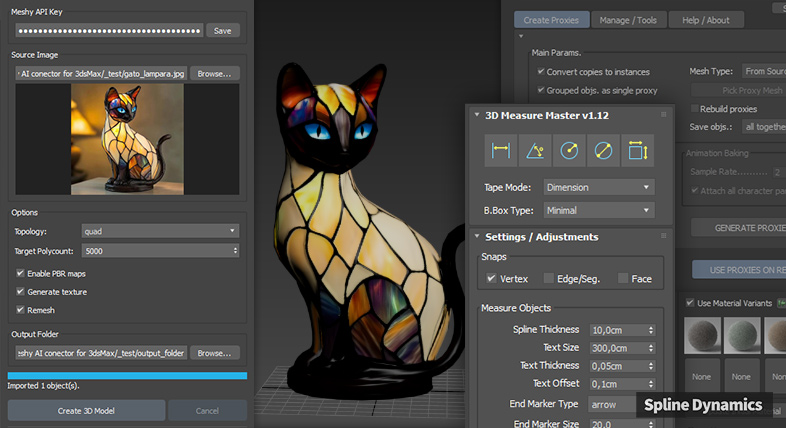
Recent projects have included custom tools that connect 3ds Max with emerging AI technologies, helping artists explore new possibilities while maintaining full control over their existing production processes.
Case Study: 20+ Hours Saved Per Week on Material Replacement
Aspace, an Australian company that designs and manufactures outdoor playground equipment, came to us with a clear bottleneck in their visualization process.
Their industrial design team works in Autodesk Inventor, producing detailed 3D models for every structure they build. A dedicated ArchViz artist then takes those models into 3ds Max to create photorealistic renders for client presentations.
The problem: every model imported from Inventor arrived with placeholder materials that had to be manually swapped out for high-quality VRay materials from their studio library. With more than 10 projects per week, this task alone was consuming a significant portion of the artist’s available time — time that could have been spent on lighting, composition, and render quality.
After analyzing their setup, we built a custom tool that handled the entire material replacement process automatically, mapping Inventor materials to the correct VRay counterparts in seconds.
The outcome was straightforward: Aspace now saves more than 20 hours per week on a task that previously required constant manual attention. The artist processes more projects in the same amount of time, with fewer errors and more room to focus on the work that makes a real difference to the final renders.
If your studio is dealing with a similar pattern, the same kind of approach can work for you.
Additional Project Examples
Star Event (Malaysia): Custom Measurement & Documentation Tool
Star Event, a multi-award-winning event marketing agency, needed a more efficient way to take measurements inside complex 3ds Max scenes while generating clear documentation for internal use and client presentations.
We developed a custom measurement system with snapping support, automatic viewport labels, and Excel/CSV export capabilities. The solution later evolved into 3D Measure Master, a commercial plugin now used by hundreds of 3ds Max professionals worldwide.
Beiga (Poland): Automated RenderStacks Setup Generation
Beiga, a studio specializing in photorealistic furniture visualization, needed a faster way to manage multiple furniture groups, material variations, cameras, and render outputs inside RenderStacks, a popular 3ds Max plugin for managing complex multi-pass render setups.
We created a custom tool that automatically builds the required RenderStacks structure, including layers, cameras, visibility rules, and render passes. Tasks that previously required extensive manual setup can now be completed in seconds, improving consistency and reducing repetitive work across projects.
What We Build
We design and develop custom tools around real production problems. Projects typically fall into a few categories:
ArchViz & Production Tools
- Revit and CAD import cleanup, scene organization, and naming conventions
- Automatic material reassignment (VRay, Corona, custom studio libraries)
- Scene preparation and polygon budget management for heavy files
- Camera setup, render state management, and batch output tools
- Multi-scene processing and project-level automation
Modeling & Scene Operations
- Parametric and procedural modeling tools built around your asset types
- Geometry cleanup, topology correction, and mesh repair tools
- Object placement, distribution, and layout systems
- Hierarchy management, naming conventions, and layer organization
Rendering, Data & Integration
- Render pass and variation management
- Lighting standardization across large scene libraries
- Data extraction, structured reporting, and custom dashboards
- Export tools for CSV, JSON, or external systems
- Bridges between 3ds Max and external platforms, services, or AI tools where it fits the production need
Most projects don’t fit neatly into a category. The tools that make the biggest difference are usually built around something very specific to how a particular team works. If your situation isn’t reflected above, it’s worth a conversation.
How We Work
We design and develop custom tools through a straightforward process, focused on your actual workflow:
1. Workflow Analysis
We start by understanding your setup — how work moves through your team, where time is being spent, and what’s causing friction. The goal isn’t to pitch a solution before understanding the problem.
2. Proposal & Scope
You receive a clear written proposal describing what will be built, how it will integrate into your existing workflow, and what it costs. No vague estimates, no open-ended commitments.
3. Tool Development
The tool is built to the agreed scope and timeline, with reliability and practical fit as the primary priorities. We design for how people actually work, not for ideal conditions.
4. Trial Version & Refinement
Before final delivery, you test a working version inside your own environment. Real use always surfaces things that testing in isolation misses. This step is how we make sure the tool actually holds up.
5. Delivery & Ongoing Support
Once approved, the tool is delivered ready for production use and includes 30 days of support. You retain full ownership of the final tool. Source code is encrypted by default; open-source delivery is available as an optional add-on.
Most projects move from first conversation to working tool in two to four weeks, depending on scope.
Let’s talk
If you have a process that’s taking more time than it should, or a problem that keeps coming back, let’s look at it together.
About Us

Spline Dynamics is a specialized 3ds Max development studio led by Hernán A. Rodenstein, a CG artist and software developer with over 10 years of experience creating production tools for artists and studios worldwide. Every custom project is handled directly by the same developer behind a growing collection of commercial 3ds Max plugins trusted by thousands of professionals in the CG industry.
Our expertise spans MaxScript and Python development, workflow automation, technical consulting, and integration with external platforms and services. Having developed and commercialized dozens of production tools over the years, we bring not only programming expertise, but also a practical understanding of how ArchViz studios, designers, and 3D artists work — and where custom tools can make the biggest impact.